

Salesforce Data Integration: 7 Integration Methods Explained
Modern organizations rarely use Salesforce as a standalone CRM. Customer data is often distributed across ERP systems, customer support platforms, marketing automation tools, accounting software, e-commerce solutions, data warehouses, and custom applications.
Without proper integration, teams spend time manually transferring data, working with duplicate records, and switching between disconnected systems. Sales teams may not see recent support interactions, finance may rely on outdated customer information, and reporting becomes fragmented.
Salesforce data integration solves these challenges by connecting Salesforce with external systems and enabling secure, automated data exchange. Depending on the business requirements, integrations can operate in real time, run on a schedule, or provide access to external data without storing it inside Salesforce.
According to Salesforce, effective data integration improves data quality, streamlines business processes, and creates a stronger foundation for analytics and AI.
In this guide, we’ll explore the seven most common Salesforce integration methods, compare their strengths and limitations, and explain how to choose the right approach for your organization.
What Is Salesforce Data Integration?
Salesforce data integration is the process of connecting Salesforce with external systems so that applications can exchange, synchronize, or access business data automatically.
Organizations commonly integrate Salesforce with:
- ERP systems
- Customer support platforms
- Marketing automation software
- Accounting applications
- E-commerce platforms
- Internal databases
- Data warehouses
- Other Salesforce organizations
The objective is more than simply moving data between applications. A successful integration ensures that every department works with accurate, consistent, and up-to-date information.
For example, after a sales representative marks an Opportunity as Closed Won, Salesforce can automatically:
- create an order in an ERP;
- generate an invoice;
- notify the customer success team;
- update inventory;
- trigger customer onboarding.
Instead of employees manually updating multiple applications, these processes run automatically and consistently.
The 7 Salesforce Data Integration Methods
There isn’t a single “best” integration method.
The right approach depends on several factors, including data volume, latency requirements, business complexity, long-term maintenance, and the number of connected systems.
Salesforce also recommends selecting an integration strategy based on architectural requirements rather than relying on a single technology for every scenario. The Salesforce Data Integration Decision Guide provides an excellent framework for evaluating different approaches.
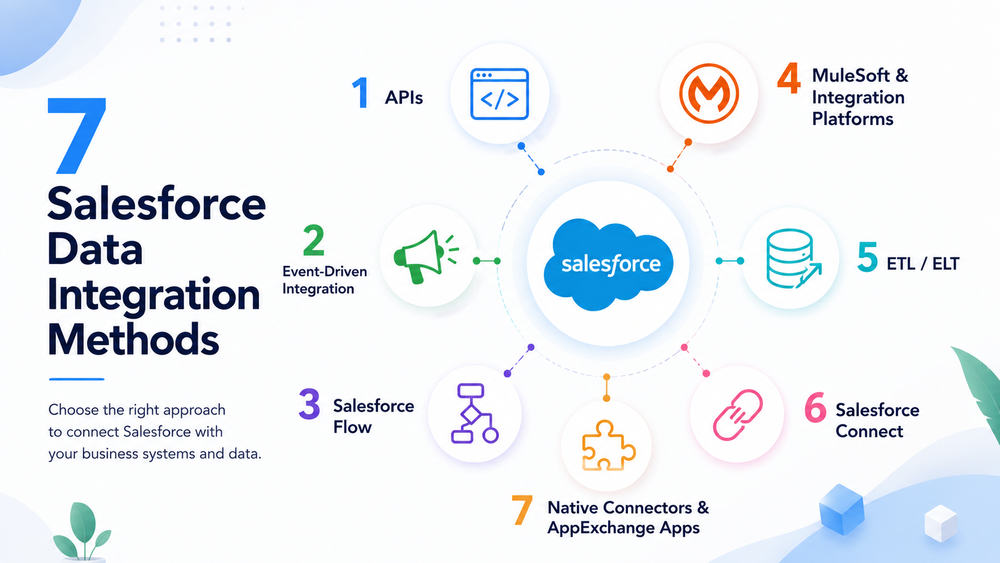
The most common Salesforce integration methods are:
- Native Salesforce APIs
- Event-Driven Integration
- Salesforce Flow
- MuleSoft and Integration Platforms
- ETL / ELT
- Salesforce Connect
- Native Connectors and AppExchange Apps
Let’s examine each method in more detail.
1. Native Salesforce APIs
Native APIs are the foundation of most Salesforce integrations. They allow external applications to communicate directly with Salesforce and offer the highest level of flexibility for custom development.
Salesforce provides several APIs, each designed for different integration scenarios.
| API | Best For |
|---|---|
| REST API | Real-time web and mobile integrations |
| SOAP API | Legacy enterprise systems |
| Bulk API 2.0 | High-volume imports and exports |
| Composite API | Multiple operations in a single request |
| GraphQL API | Efficient retrieval of related data |
Salesforce provides comprehensive documentation for each API:
Best for
Choose native APIs when:
- external applications need direct access to Salesforce;
- custom business logic is required;
- integrations involve standard or custom objects;
- developers need complete control over requests, responses, and authentication.
For example, an e-commerce platform can create Leads, update Accounts, or retrieve Order information immediately after a customer completes a purchase.
Advantages
- Maximum flexibility
- Real-time communication
- Supports standard and custom objects
- Suitable for both simple and enterprise integrations
- Extensive Salesforce documentation
Limitations
- Requires development expertise
- API limits must be monitored
- Authentication and error handling must be implemented
- Point-to-point integrations become harder to maintain as more systems are connected
If you’re planning an API-based integration, our Salesforce API Integration Best Practices guide explains how to build secure, scalable, and maintainable integrations.
2. Event-Driven Integration
Traditional integrations often rely on polling, where external applications repeatedly check Salesforce for changes. While effective in some scenarios, polling increases API usage and may introduce unnecessary delays.
An event-driven architecture works differently. Salesforce automatically publishes events whenever important business actions occur, allowing subscribed applications to react almost immediately.
Salesforce supports two primary technologies for this approach:
| Technology | Typical Use Case |
|---|---|
| Change Data Capture | Synchronizing record changes |
| Platform Events | Publishing business events |
Change Data Capture
Change Data Capture (CDC) publishes notifications whenever supported Salesforce records are created, updated, deleted, or restored.
Instead of continuously requesting data through APIs, external systems simply subscribe to record changes.
Typical scenarios include:
- synchronizing customer records with an ERP;
- updating reporting databases;
- refreshing search indexes;
- synchronizing CRM changes with external applications.
Platform Events
Unlike CDC, Platform Events represent business activities rather than database changes.
Examples include:
- Order Submitted
- Payment Completed
- Contract Approved
- Subscription Activated
Multiple applications can subscribe to the same event, reducing tight coupling between systems and improving scalability.
Best for
- Near real-time integrations
- Event-driven architectures
- Multi-system communication
- Asynchronous business processes
Advantages
- Reduces unnecessary API polling
- Supports scalable architectures
- Multiple systems can consume the same event
- Loosely couples connected applications
Limitations
- More complex monitoring
- Event consumers must be implemented
- Platform limits still apply
- Not every business process requires an event-driven approach
3. Salesforce Flow
Not every integration requires custom development.
Salesforce Flow is primarily an orchestration tool that enables administrators to automate business processes and integrate Salesforce with external systems using a low-code approach.
Flow can work with external APIs through HTTP Callouts, External Services, Apex actions, and MuleSoft for Flow, making it a practical option for many business integrations without requiring large amounts of custom code.
For example, a Flow can:
- send customer information to an external application;
- receive a response from an API;
- create or update Salesforce records;
- notify users;
- automate approval workflows.
Best for
- Low-code integrations
- Business process automation
- Record-triggered workflows
- Admin-managed integrations
Advantages
- Fast implementation
- Minimal coding
- Easy maintenance
- Native Salesforce automation
Limitations
- Not intended for processing very large datasets
- Complex transformations usually require Apex or middleware
- Enterprise integration scenarios often need additional technologies
If your organization relies heavily on Flow, our Salesforce Flow Best Practices guide explains how to build scalable and maintainable automations.
4. MuleSoft and Integration Platforms
As organizations adopt more business applications, managing numerous point-to-point integrations becomes increasingly difficult. Every connection introduces additional authentication, monitoring, transformation logic, error handling, and maintenance.
MuleSoft, part of the Salesforce ecosystem, addresses this challenge by acting as an enterprise integration platform that centralizes API management, orchestration, data transformation, security, and monitoring between Salesforce and external systems.
Instead of creating separate integrations for every application, organizations can expose reusable APIs and manage integrations through a centralized platform. This reduces duplication, improves governance, and simplifies long-term maintenance.
Best for
- Enterprise organizations
- Multiple connected systems
- Complex business processes
- Centralized API management
- Large integration landscapes
Advantages
- Reusable APIs
- Centralized monitoring
- Advanced data transformation
- Better governance
- Easier long-term maintenance
Limitations
- Higher implementation costs
- More complex architecture
- Often unnecessary for small businesses with only a few integrations
Many enterprise Salesforce environments combine MuleSoft with REST APIs, Platform Events, and Salesforce Flow to create scalable, maintainable integration architectures rather than relying on a single integration method.
5. ETL / ELT
Not every Salesforce integration needs to happen in real time. Organizations often need to move large volumes of data for reporting, analytics, backups, or migration projects. In these scenarios, ETL (Extract, Transform, Load) and ELT (Extract, Load, Transform) are common approaches.
With ETL, data is extracted from source systems, transformed into the required format, and then loaded into the destination. ELT follows a different sequence: data is first loaded into a data warehouse and transformed afterward, making it well suited for modern cloud-based analytics platforms.
Salesforce provides an overview of ETL and ELT approaches in its Guide to Data Integration.
Typical ETL/ELT platforms include Matillion, Informatica, Talend, and Fivetran.
Best for
- Data warehouse synchronization
- Business intelligence
- Large-scale data migrations
- Scheduled imports and exports
- Historical reporting
Advantages
- Efficiently processes millions of records
- Supports complex transformations
- Ideal for analytics and reporting
- Automated scheduled execution
Limitations
- Usually not suitable for real-time operations
- Requires additional infrastructure
- Better for analytical workloads than transactional business processes
6. Salesforce Connect
Not every integration requires copying data into Salesforce.
Salesforce Connect enables users to access external data directly from Salesforce while keeping the original records in the source system. Instead of synchronizing information, Salesforce retrieves it when needed through External Objects.
This approach is known as data virtualization.
Unlike traditional integrations that replicate data, Salesforce Connect allows external systems to remain the system of record. Users still see the information within Salesforce, but the data itself stays in the external application.
For example, an ERP may store millions of product or inventory records that would be unnecessary and expensive to duplicate in Salesforce.
Best for
- ERP integrations
- Large external datasets
- Legacy applications
- Frequently changing operational data
Advantages
- Eliminates unnecessary data duplication
- Reduces Salesforce storage requirements
- Provides real-time access to external information
- Keeps the external system as the source of truth
Limitations
- Depends on external system availability
- Performance depends on the external source
- Some Salesforce features have limitations when used with External Objects
7. Native Connectors and AppExchange Apps
For many common business applications, you don’t need to build an integration from scratch.
Salesforce AppExchange provides thousands of prebuilt integrations, while many software vendors also offer native Salesforce connectors that significantly reduce implementation time.
Explore available solutions on AppExchange.
Popular integrations include:
- Slack
- HubSpot
- DocuSign
- Mailchimp
- Shopify
- QuickBooks
- Freshdesk
- Intercom
These integrations often include preconfigured authentication, field mapping, and synchronization, allowing organizations to deploy faster than custom-built integrations.
For example, if you’re connecting a customer support platform, our Freshdesk Salesforce Integration Guide explains the implementation process and best practices.
If your organization uses Intercom, our Intercom Salesforce Integration Guide covers the setup process and common integration scenarios.
Best for
- Standard SaaS applications
- Faster implementation
- Organizations with limited development resources
Advantages
- Quick deployment
- Vendor-supported
- Minimal custom development
- Easier long-term maintenance
Limitations
- Limited customization
- Vendor-specific capabilities
- May not support every custom business process
Salesforce Integration Methods Comparison
| Method | Real-Time | Large Data Volumes | Complexity | Best For |
|---|---|---|---|---|
| Salesforce APIs | ✅ | Limited | Medium | Custom applications |
| Event-Driven Integration | ✅ | ❌ | Medium | Notifications and business events |
| Salesforce Flow | ✅ | ❌ | Low | Low-code automation |
| MuleSoft | ✅ | ✅ | High | Enterprise integration |
| ETL / ELT | ❌ | ✅ | Medium | Analytics and reporting |
| Salesforce Connect | ✅ | ✅ | Medium | External data access |
| Native Connectors | Depends | Depends | Low | Standard SaaS integrations |
How to Choose the Right Integration Method
There is no universal integration strategy. Most organizations combine multiple approaches depending on the business process.
Salesforce also recommends evaluating integrations based on factors such as latency, data ownership, system architecture, and maintenance requirements.
Read the official Salesforce Data Integration Decision Guide.
| If you need… | Recommended Method |
|---|---|
| Custom application integration | Salesforce APIs |
| Business event notifications | Platform Events / CDC |
| Low-code automation | Salesforce Flow |
| Enterprise integration platform | MuleSoft |
| Data warehouse synchronization | ETL / ELT |
| External data without replication | Salesforce Connect |
| Quick SaaS integration | Native Connector |
Salesforce Integration Best Practices
Regardless of the integration method, following proven architectural principles will improve reliability, scalability, and security.
Define the System of Record
Each business object should have one authoritative source to avoid duplicate updates and conflicting information.
Use Secure Authentication
Use OAuth whenever possible instead of storing usernames and passwords.
Our Salesforce OAuth 2.0 Best Practices guide explains how to implement secure authentication.
Design Around API Limits
Optimize requests, use Bulk API for large datasets, and avoid unnecessary polling where event-driven architectures are more appropriate.
Test Before Production
Validate integrations in a Sandbox environment using realistic business scenarios before deployment.
Monitor Integrations
Track API usage, authentication failures, synchronization errors, and processing times to detect issues early.
Follow Security Best Practices
Apply the principle of least privilege, review connected applications regularly, and protect sensitive business data.
For additional recommendations, see our Salesforce Integration Security Best Practices guide.
Common Salesforce Integration Challenges
Even well-designed integrations can encounter operational issues.
The most common challenges include:
- API limits
- Duplicate or inconsistent records
- Authentication failures
- Field mapping differences
- Error handling and retry logic
Addressing these challenges during the design phase significantly reduces long-term maintenance and improves system reliability.
Conclusion
Salesforce provides multiple integration methods because different business scenarios require different architectural approaches.
- Salesforce APIs offer maximum flexibility for custom integrations.
- Event-Driven Integration supports scalable asynchronous communication.
- Salesforce Flow enables low-code automation.
- MuleSoft simplifies enterprise integration management.
- ETL / ELT is ideal for analytics and large-volume data processing.
- Salesforce Connect provides real-time access to external data without replication.
- Native Connectors and AppExchange Apps accelerate integrations with popular SaaS platforms.
In practice, most organizations combine several of these methods. For example, APIs may power customer-facing applications, Platform Events can synchronize business events, MuleSoft orchestrates enterprise processes, and ETL pipelines prepare data for analytics.
The right integration strategy depends on your business goals, existing technology stack, and long-term scalability requirements.
What is Salesforce data integration?
Salesforce data integration is the process of connecting Salesforce with external applications to exchange, synchronize, or access business data automatically.
Which Salesforce integration method should I choose?
It depends on your requirements. REST APIs are ideal for custom applications, Salesforce Flow works well for low-code automation, MuleSoft supports enterprise architectures, ETL/ELT is designed for analytics, and Salesforce Connect provides access to external data without replication.
What is the difference between Salesforce APIs and Salesforce Connect?
Salesforce APIs transfer or synchronize data between systems, while Salesforce Connect allows Salesforce to access external data without storing a copy inside the CRM.
When should I use Platform Events instead of REST APIs?
Platform Events are best for asynchronous, event-driven communication where multiple systems react to business events. REST APIs are more appropriate when an application requires an immediate request-and-response interaction.
Is Salesforce Flow suitable for integrations?
Yes. Salesforce Flow is a powerful low-code orchestration tool that can automate business processes and communicate with external systems through APIs and other integration technologies.
Can multiple Salesforce integration methods be used together?
Absolutely. Most enterprise Salesforce implementations combine APIs, Flow, Platform Events, MuleSoft, ETL tools, Salesforce Connect, and native connectors to meet different business and technical requirements.