

Salesforce Integration Architecture: Best Practices for Enterprise Systems
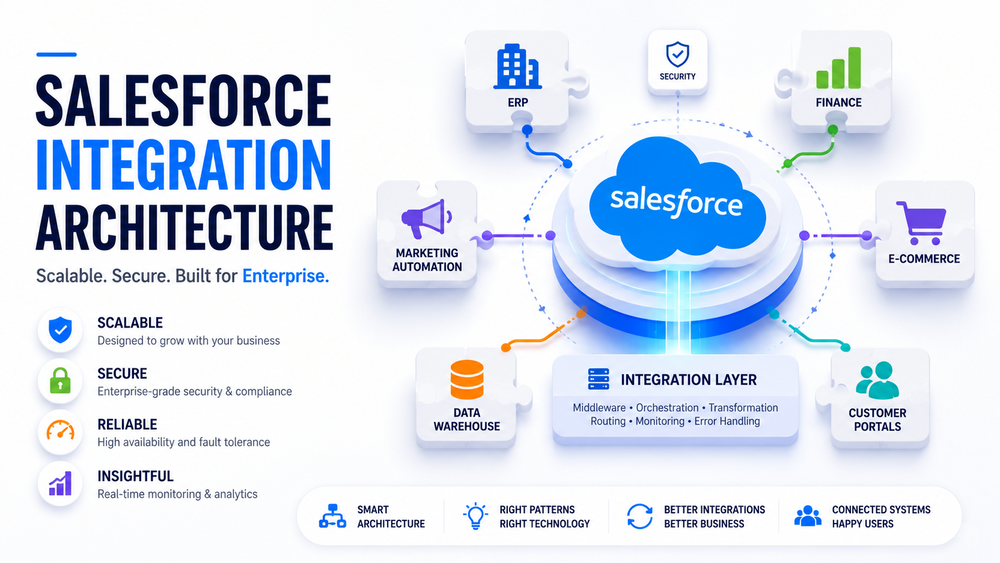
Modern Salesforce environments rarely operate as standalone applications. In most organizations, Salesforce exchanges information with ERP platforms, finance systems, e-commerce applications, customer portals, marketing automation platforms, identity providers, data warehouses, and other enterprise systems.
Connecting these applications is relatively straightforward when only a few integrations exist. As the business grows, however, every new connection increases architectural complexity. Point-to-point integrations multiply, business logic becomes duplicated, API consumption grows, and maintaining data consistency across systems becomes increasingly difficult.
This is where Salesforce Integration Architecture becomes essential.
Rather than focusing on individual connections, integration architecture defines how an entire enterprise ecosystem should communicate. It establishes integration patterns, system responsibilities, data ownership, security, monitoring, and governance, ensuring that integrations follow a consistent approach instead of solving each requirement independently.
A well-designed architecture helps organizations:
- scale integrations without excessive complexity;
- reduce operational and maintenance costs;
- improve reliability and fault tolerance;
- simplify the onboarding of new systems;
- strengthen security and compliance;
- maintain consistent business data across applications.
Organizations planning new API connections should also review our guide to Salesforce API Integration: Best Practices for Scalable Systems, which explains how API selection, authentication, performance, and error handling affect long-term integration stability.
In this guide, you’ll learn:
- what Salesforce Integration Architecture is;
- the main Salesforce integration patterns;
- how to choose the right integration approach;
- when to use different Salesforce APIs;
- architectural best practices for enterprise environments;
- common integration mistakes and how to avoid them.
What Is Salesforce Integration Architecture?
Salesforce Integration Architecture is the strategic design of how Salesforce communicates with external systems across an enterprise.
It combines architectural principles, integration patterns, APIs, middleware, security, monitoring, and governance into a unified framework that supports reliable information exchange between business applications.
A complete integration architecture defines:
- which systems communicate with Salesforce;
- how data flows between systems;
- when information is exchanged;
- which system owns each business entity;
- which integration pattern is used;
- how data is transformed;
- how authentication is managed;
- how failures are detected and recovered;
- how integrations are monitored throughout their lifecycle.
It is important to distinguish between an integration and an integration architecture.
An individual integration solves a specific technical problem—for example, synchronizing customer accounts between Salesforce and an ERP system.
Integration architecture answers broader enterprise questions:
- Which system is responsible for customer data?
- Should communication be synchronous or asynchronous?
- How should failures be handled?
- How are duplicate transactions prevented?
- Where should business logic be executed?
- Which APIs should be reused across multiple integrations?
- How should new enterprise applications be connected in the future?
These decisions have a greater impact on long-term scalability than selecting a particular API or middleware platform.
Our earlier guide to Salesforce Integration Architecture for Scalable Systems explores the foundational components of scalable API design, authentication, monitoring, and error recovery.
Why Salesforce Integration Architecture Matters
Many integration projects begin with a simple business requirement:
Connect Salesforce to our ERP.
Soon another request appears:
Integrate Salesforce with the marketing platform.
Then another:
Synchronize inventory from the warehouse system.
Over time, organizations can accumulate dozens of independent integrations created by different teams, vendors, and departments.
Initially, everything may appear to work. Eventually, however, common problems emerge:
- duplicated business logic;
- inconsistent customer records;
- conflicting updates between systems;
- excessive API consumption;
- slow synchronization;
- difficult troubleshooting;
- increasing maintenance costs;
- security inconsistencies;
- tightly coupled applications.
These problems rarely result from API functionality alone. They are usually symptoms of fragmented architecture.
| Weak integration architecture | Scalable integration architecture |
|---|---|
| Point-to-point connections | Reusable integration services |
| Polling for every update | Event-driven communication where appropriate |
| Duplicate business logic | Centralized orchestration and transformation |
| Several systems modifying the same data | Clearly defined system of record |
| Manual troubleshooting | Centralized monitoring and alerting |
| Shared administrator credentials | Dedicated integration identities |
| Difficult expansion | New applications connected through reusable interfaces |
Enterprise architecture is ultimately about reducing long-term complexity rather than merely delivering the next integration.
Salesforce’s official Integration Patterns guide recommends selecting patterns according to business requirements, timing, direction, volume, coupling, and recovery needs—not simply according to the easiest available implementation.
Enterprise Integration Architecture Principles
Successful Salesforce Integration Architecture follows several fundamental principles regardless of the specific APIs or middleware products involved.
Design Around Business Processes
Integrations should support complete business workflows, not simply transfer records.
Instead of asking:
How do we send this object?
Architects should ask:
- Which business event started the process?
- Which systems participate?
- Which system owns the data?
- Does the user need an immediate response?
- What happens if one system becomes unavailable?
- How is completion confirmed?
For example, an Order-to-Cash process may involve Salesforce, an ERP, a payment platform, a warehouse system, and a finance application. Designing each connection separately can create fragmented logic and poor visibility. Designing the full business process first makes it easier to assign responsibilities and choose appropriate integration patterns.
Keep Systems Loosely Coupled
Enterprise systems should remain as independent as possible.
When Salesforce depends directly on another application for every operation, even a temporary outage can interrupt multiple business processes.
Loose coupling allows applications to continue operating independently while exchanging information through APIs, messages, or events. This is one reason asynchronous and event-driven approaches are often valuable in large enterprise environments.
However, asynchronous communication is not automatically the correct answer. Processes such as payment authorization or real-time inventory confirmation may genuinely require an immediate response. The architecture should reflect the actual business need.
Establish a Single Source of Truth
Every important business domain should have one authoritative system responsible for maintaining its data.
| Business data | Typical system of record |
|---|---|
| Leads and Opportunities | Salesforce |
| Inventory | ERP |
| Payments | Finance platform |
| Product catalog | ERP or PIM |
| Customer identity | Identity provider |
Without clear ownership, applications may overwrite one another’s changes or maintain different versions of the same customer, order, or product.
A source-of-truth strategy should also define:
- how external IDs are managed;
- how duplicate records are prevented;
- how conflicts are resolved;
- when data is replicated;
- how failed synchronizations are reconciled.
For a deeper discussion of synchronization models and data ownership, see Salesforce Data Integration for Scalable Enterprise Systems.
Design for Failure
Failures are normal in distributed enterprise systems.
Networks become unavailable, APIs time out, authentication tokens expire, messages arrive more than once, and downstream systems reject invalid data.
A robust architecture includes:
- retry mechanisms;
- exponential backoff;
- persistent queues;
- dead-letter handling;
- idempotent operations;
- reconciliation processes;
- centralized logging;
- operational alerts.
The goal is not to eliminate every possible failure. It is to ensure failures can be detected, isolated, repeated safely, and resolved without creating duplicate or inconsistent transactions.
Build for Observability
An integration is not complete merely because it can transfer data successfully.
Operations teams must also be able to answer:
- Where is a specific transaction now?
- Which system failed?
- How long did processing take?
- Was the operation retried?
- Did Salesforce receive the final result?
- Is API consumption increasing?
- Are messages accumulating in a queue?
Correlation IDs, structured logs, dashboards, alerts, and reconciliation reports should be designed alongside the integration itself.
Core Types of Salesforce Integration
Salesforce integrations can generally be grouped into three broad categories:
- data integration;
- process integration;
- virtual integration.
The right category depends on whether the requirement involves moving data, coordinating a business process, or exposing external information without replication.
Data Integration
Data integration transfers, synchronizes, or replicates information between Salesforce and external systems.
Typical examples include:
- synchronizing customer accounts with an ERP;
- importing a product catalog;
- exporting Salesforce data to a warehouse;
- migrating historical records;
- synchronizing prices or inventory.
Data integration may operate in real time, near real time, or through scheduled batch jobs.
The official Salesforce Data Integration Decision Guide recommends evaluating direction, data volume, latency, transformation complexity, system ownership, maintainability, and total cost when selecting a data integration approach.
Process Integration
Process integration coordinates a business workflow that spans several enterprise applications.
Consider a typical Order-to-Cash process:
- Salesforce records a Closed Won Opportunity.
- Middleware validates and enriches the order information.
- The ERP creates the order.
- A finance system generates an invoice.
- The warehouse receives fulfillment instructions.
- Salesforce receives the final order status.
This is more complex than copying records. The architecture must coordinate several steps, handle partial failures, prevent duplicate processing, and maintain visibility across the entire transaction.
Virtual Integration
Virtual integration allows Salesforce users to access external data without permanently replicating it into Salesforce.
For example, service agents may need to view:
- inventory stored in an ERP;
- payment details stored in a finance platform;
- order history held in a legacy system;
- product information maintained in a PIM.
Technologies such as Salesforce Connect can expose external information while keeping the authoritative data in its original system.
This approach reduces storage and synchronization requirements, but it creates a runtime dependency on the external source. Architects must therefore evaluate availability, latency, supported queries, security, and expected user experience.
Why Middleware Matters
One of the central architectural decisions is whether Salesforce should communicate directly with external applications or through middleware.
Direct connections may be sufficient when:
- only one or two simple integrations exist;
- transformations are minimal;
- the external service is stable;
- centralized orchestration is unnecessary.
As the number of systems grows, middleware becomes more valuable because it centralizes responsibilities that would otherwise be duplicated across integrations.
A middleware or integration platform can provide:
- routing;
- data transformation;
- orchestration;
- protocol conversion;
- queue management;
- retry handling;
- security policies;
- centralized monitoring.
Without middleware:
Salesforce
   ├── ERP
   ├── Finance
   ├── HR
   ├── Marketing
   └── Warehouse
Every connection contains its own authentication, transformation, error handling, and monitoring logic.
With middleware:
Salesforce
      │
      ▼
Middleware
      │
 ┌────┼─────┬─────┬─────┐
 ▼    ▼     ▼     ▼     ▼
ERP Finance HR Marketing Warehouse
This design reduces coupling and allows common capabilities to be reused.
Middleware should not be introduced automatically into every project, however. It adds platform costs, operational responsibilities, and another architectural layer. Its value is highest when integration complexity, system count, transformation requirements, or governance needs justify it.
Orchestration vs Choreography
Enterprise process integration commonly uses two coordination models.
Orchestration
In orchestration, a central component controls the workflow.
Middleware
   ├── Calls ERP
   ├── Calls Finance
   ├── Updates Salesforce
   └── Handles failures
The orchestrator knows the sequence of steps and tracks the overall transaction.
This approach provides:
- centralized process visibility;
- controlled execution order;
- simpler handling of complex dependencies;
- one location for compensation and recovery logic.
Its disadvantage is greater dependence on the orchestrator.
Choreography
In choreography, systems react independently to events.
OrderReady Event
      │
 ┌────┼─────────┐
 ▼    ▼         ▼
ERP Finance Analytics
No single application controls the complete workflow. Each participant subscribes to relevant events and performs its own action.
This provides:
- lower coupling;
- easier subscriber expansion;
- stronger scalability;
- greater system autonomy.
However, end-to-end monitoring and business-process visibility can become harder.
Most enterprise environments use a combination of orchestration and choreography rather than choosing only one model.
Choosing the Right Salesforce API
After selecting an integration pattern, the next step is choosing the most appropriate Salesforce technology. The API should support the architecture—not determine it.
Different APIs are optimized for different workloads.
| API or Technology | Best Used For |
|---|---|
| REST API | Standard synchronous CRUD operations |
| SOAP API | Enterprise systems requiring WSDL-based integrations |
| Composite API | Multiple Salesforce operations within one request |
| Bulk API 2.0 | High-volume asynchronous imports and exports |
| Platform Events | Publishing custom business events |
| Change Data Capture | Streaming Salesforce record changes |
| Pub/Sub API | Enterprise event streaming |
| Salesforce Connect | Accessing external data without replication |
| Metadata API | Metadata deployment and configuration |
| GraphQL API | Flexible retrieval of related Salesforce data |
For example, retrieving several customer records through the REST API is straightforward and efficient. Processing millions of records, however, is better suited to Bulk API 2.0, while business notifications are usually handled through Platform Events or Change Data Capture rather than constant polling.
API selection also affects scalability and operational costs. Inefficient integrations often generate unnecessary API requests that eventually impact platform performance.
To understand how Salesforce calculates API consumption and how architectural decisions influence API usage, see our guide on Salesforce API Limits: How to Monitor and Optimize API Usage.
Enterprise Integration Best Practices
Technology alone doesn’t create a scalable architecture. Long-term success depends on following consistent architectural principles.
Design Around Business Events
Enterprise integrations should begin with business events instead of technical operations.
For example:
- Opportunity Closed Won
- Order Created
- Invoice Paid
- Shipment Delivered
- Customer Registered
Once the event is defined, architects can determine:
- which systems should react;
- whether processing is synchronous or asynchronous;
- which APIs or events should be used;
- how failures should be handled.
This approach produces integrations that are easier to maintain and extend.
Reuse Integration Services
Avoid implementing the same logic repeatedly across multiple systems.
Instead of every application implementing its own customer synchronization, create reusable services or APIs that can be shared throughout the organization.
Benefits include:
- less duplicated logic;
- easier maintenance;
- consistent validation;
- centralized monitoring;
- simpler onboarding of new systems.
Build Secure Integrations
Security should be considered during architecture design—not after deployment.
Enterprise integrations should implement:
- OAuth 2.0 authentication;
- Named Credentials;
- least-privilege access;
- dedicated integration users;
- encrypted communication (TLS);
- centralized credential management;
- audit logging.
Our related guides provide more detail:
- Secure Salesforce Integrations: Enterprise Security Best Practices
- Salesforce OAuth Security Best Practices for Enterprise Systems
- Salesforce Connected App Permissions Best Practices
Monitor Every Integration
Reliable architectures require visibility.
Monitoring should include:
- API consumption;
- transaction latency;
- failed requests;
- retry queues;
- event delivery;
- system availability;
- business transaction status;
- alerting and dashboards.
Monitoring enables teams to identify problems before they affect users.
Salesforce also recommends monitoring integration performance, API usage, and error handling as part of an overall integration strategy.
Common Salesforce Integration Architecture Mistakes
Many integration issues stem from architectural decisions rather than platform limitations.
Building Too Many Point-to-Point Integrations
Every new direct connection increases complexity and maintenance effort.
Reusable services or middleware provide a more scalable approach.
Using Real-Time Integration Everywhere
Real-time processing is valuable only when the business requires an immediate response.
Many processes—such as reporting, analytics, or nightly synchronization—are better suited to asynchronous or batch execution.
Polling Instead of Events
Polling external systems every few minutes generates unnecessary API traffic.
Platform Events, Change Data Capture, and Pub/Sub API often provide a more scalable solution.
No Defined Source of Truth
When multiple systems update the same business object independently, duplicate records and conflicting information become inevitable.
Every business domain should have one authoritative system.
Ignoring Failure Recovery
Temporary failures are unavoidable.
Architectures should include:
- retries;
- queues;
- dead-letter processing;
- reconciliation;
- operational alerts.
Selecting APIs Before Designing the Architecture
Choosing REST, SOAP, or Bulk API should be one of the final architectural decisions—not the first.
Business requirements should determine the integration pattern, which in turn determines the appropriate technology.
Practical Enterprise Example
Consider a typical Order-to-Cash process.
A sales representative closes an opportunity.
Salesforce publishes an OrderReady event.
Middleware validates the payload, enriches customer information, and creates the order in the ERP system.
The ERP returns the external order identifier, which updates Salesforce through a secure API.
Throughout the process, monitoring tracks every transaction.
Opportunity Closed Won
           │
           ▼
Platform Event
           │
           ▼
Middleware
           │
           ▼
ERP Creates Order
           │
           ▼
Salesforce Updated
           │
           ▼
Monitoring & Alerts
This architecture separates responsibilities, reduces dependencies, and provides clear operational visibility.
How Success Craft Can Help
Enterprise integration projects require more than technical implementation. They require an architecture that remains scalable as systems, users, and business processes evolve.
Success Craft helps organizations:
- assess existing integration architectures;
- define enterprise integration strategies;
- design APIs and event-driven solutions;
- implement middleware and orchestration;
- optimize Salesforce API usage;
- improve security and governance;
- monitor and support enterprise integrations.
Whether you’re modernizing legacy integrations or building a new Salesforce ecosystem, our team can help design an architecture that supports long-term growth.
Conclusion
Salesforce Integration Architecture is more than connecting systems—it is the foundation for reliable enterprise operations.
Organizations that design integrations around business processes, establish clear data ownership, select appropriate integration patterns, and monitor every transaction are better positioned to scale without increasing operational complexity.
Rather than viewing integrations as isolated technical projects, treat them as part of a long-term enterprise architecture. This approach leads to lower maintenance costs, greater resilience, improved security, and a Salesforce ecosystem that can grow alongside the business.
What is Salesforce Integration Architecture?
Salesforce Integration Architecture is the overall design framework for connecting Salesforce with enterprise systems. It defines integration patterns, APIs, security, monitoring, and governance to create scalable and reliable integrations.
Which Salesforce integration pattern should I choose?
The appropriate pattern depends on your business requirements. Request and Reply is suitable for immediate responses, Batch Data Synchronization for high-volume processing, Event-Driven Integration for asynchronous communication, and Data Virtualization when external data should remain outside Salesforce.
Should I use middleware for Salesforce integrations?
Middleware is recommended when multiple systems require routing, orchestration, transformation, centralized monitoring, or error handling. It reduces point-to-point dependencies and simplifies enterprise integration management.
What is the difference between REST API and Bulk API?
REST API is intended for lightweight synchronous operations, while Bulk API is designed for asynchronous processing of large datasets such as migrations, imports, and scheduled synchronization.
How can I build scalable Salesforce integrations?
Build around business processes, define a single source of truth, use the appropriate integration patterns, implement monitoring and error recovery, and follow enterprise security best practices.