

Node.js Architecture Best Practices for Scalable Applications
Building a Node.js application is relatively easy. Building one that remains understandable, testable, and reliable as the product grows is much harder. Node.js architecture best practices help teams avoid tightly coupled code, oversized controllers, scattered database logic, and integrations that become increasingly difficult to maintain.
Architecture becomes particularly important when a simple backend evolves into a larger system with multiple APIs, databases, third-party integrations, background processes, and several developers working on the same codebase.
The goal, however, is not to introduce as many architectural patterns as possible. A good Node.js architecture should create clear boundaries between responsibilities while remaining appropriate for the actual complexity of the application.
Architecture should solve today’s problems while leaving reasonable room for tomorrow’s growth—not optimize prematurely for a scale the application may never reach.
In this guide, we’ll explore practical Node.js architecture best practices for structuring applications, separating business logic, organizing modules, managing dependencies, handling external integrations, and preparing applications for production and future growth.
If you’re new to the runtime itself, start with our guide to what Node.js is and how it works before moving into application architecture.
What Makes a Good Node.js Architecture?
There is no single architecture that every Node.js application should follow.
A small REST API and a large SaaS platform have very different requirements. Applying the same structure to both can either leave the larger system poorly organized or make the smaller one unnecessarily complicated.
Instead, a strong Node.js architecture usually follows several broader principles:
- Separation of concerns — each part of the application has a clear responsibility.
- Modularity — functionality is divided into components with defined boundaries.
- Loose coupling — changing one module should not require rewriting unrelated parts of the application.
- Testability — business logic can be tested without unnecessarily depending on HTTP, databases, or third-party systems.
- Maintainability — developers can understand where functionality belongs and modify it safely.
- Scalability — the architecture can evolve as traffic, data volume, functionality, and team size grow.
- Security — authentication, authorization, validation, configuration, and external access are treated as architectural concerns.
- Observability — developers can understand what is happening inside the application once it is running in production.
The important principle is simple: the best architecture is not necessarily the most complex architecture.
Patterns such as Clean Architecture, dependency injection, repositories, domain-driven design, and microservices can solve real problems. But adding them before those problems exist may introduce abstractions without delivering enough value.
The architecture should evolve with the requirements of the application.
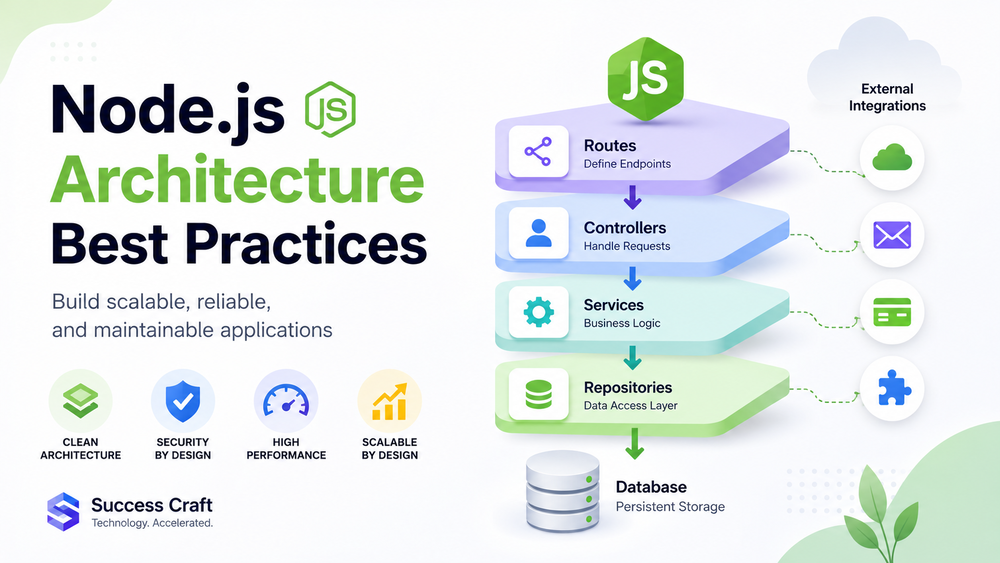
1. Separate Your Node.js Application into Clear Layers
One of the most useful Node.js architecture best practices is separating HTTP handling, business logic, and data access instead of putting everything inside route handlers.
A common layered flow looks like this:
Routes → Controllers → Services → Repositories → Database
Each layer has a different responsibility.
Routes and Controllers
Routes determine which part of the application handles an incoming request.
Controllers sit close to the HTTP layer. They typically receive input, call the appropriate application or business service, and create the HTTP response.
A controller should generally not contain large amounts of business logic or direct database queries.
For example, instead of implementing an entire checkout workflow inside:
POST /orders
the controller can validate or pass validated request data to an order service responsible for coordinating the business operation.
Services
Services contain application and business logic.
An OrderService, for example, might be responsible for:
- checking whether an order can be created;
- applying business rules;
- coordinating payment and inventory operations;
- calling repositories;
- triggering other application services.
This separation makes business logic easier to reuse and test independently of HTTP requests.
Repositories and Data Access
Repositories or another dedicated data-access layer can isolate persistence operations from the rest of the application.
Instead of allowing controllers and services throughout the codebase to construct database queries independently, data access can be concentrated behind defined boundaries.
This creates a clearer dependency flow:
HTTP → Business Logic → Data Access
rather than allowing every layer to communicate directly with every other layer.
A simple Node.js project might therefore look like this:
src/
├── routes/
├── controllers/
├── services/
├── repositories/
├── models/
├── middleware/
├── config/
└── utils/
This is not an official Node.js project structure or a rule that every application must follow. It is one possible implementation of separation of concerns.
The important part is not the folder names. It is maintaining clear responsibilities between different parts of the application.
As applications become more complex, this layer-oriented organization can also evolve into a domain-oriented structure.
LogRocket’s updated guide to Node.js project architecture best practices similarly emphasizes separation of roles, modular code, service and data-access layers, isolated configuration, dependency injection, testing, and dedicated layers for third-party service calls.
2. Organize Large Node.js Applications by Business Domain
A traditional folder structure works well when a project is relatively small:
controllers/
services/
repositories/
models/
But imagine that the application eventually contains hundreds of files related to users, subscriptions, orders, payments, notifications, reporting, and integrations.
Finding everything associated with one business capability can become increasingly difficult because its controller is in one directory, its service in another, its repository somewhere else, and its tests in yet another location.
For larger applications, organizing code around features or business domains can provide clearer boundaries.
For example:
src/
├── users/
├── orders/
├── payments/
├── notifications/
├── integrations/
└── shared/
Each module can then contain the components it needs:
orders/
├── order.controller.ts
├── order.service.ts
├── order.repository.ts
├── order.routes.ts
├── order.validation.ts
└── order.test.ts
This makes orders a recognizable application capability rather than a collection of files distributed across the entire project.
A domain-oriented structure can provide several advantages as an application grows:
- related functionality stays together;
- module ownership becomes clearer;
- developers can navigate large codebases more easily;
- cross-module dependencies become easier to identify;
- individual modules are easier to test and modify;
- teams can work on different capabilities with fewer unnecessary overlaps.
This does not mean every Node.js project should immediately adopt domain-driven design or Clean Architecture.
For a small service with a handful of endpoints, a conventional layered structure may be easier to understand and maintain. The point is to recognize when the original organization no longer reflects the complexity of the application.
A useful progression can therefore be:
Simple Application → Layered Architecture → Domain-Oriented Modular Architecture
rather than:
Simple Application → Microservices Immediately
That distinction becomes especially important when teams begin planning for scalability.
3. Keep Business Logic Independent from Frameworks
Frameworks such as Express, Fastify, and NestJS can simplify HTTP handling, routing, middleware, validation, and many other development tasks.
But the framework should not become the business architecture itself.
Consider an endpoint that:
- validates a request;
- queries the database;
- calculates a price;
- calls a payment provider;
- updates an order;
- sends a notification;
- returns the HTTP response.
Placing all of this directly inside a route handler creates tight coupling between HTTP handling, business rules, persistence, and external services.
Instead of:
Route
  ↓
Validation + Database + Business Logic + External API + Response
prefer boundaries closer to:
Route
  ↓
Controller
  ↓
Service
  ↓
Repository / Integration
The service can then express the actual business operation without needing to know how the HTTP route is implemented.
This separation provides several practical benefits.
Easier Testing
Business rules can be tested directly without starting an HTTP server or connecting to every infrastructure dependency.
Easier Refactoring
Changing a route, database implementation, or external API does not necessarily require rewriting core business logic.
Lower Framework Coupling
The application becomes less dependent on framework-specific APIs throughout the entire codebase.
Reusable Logic
The same service may potentially be called from an HTTP controller, background worker, scheduled task, or another internal component.
This principle is also central to approaches such as Clean Architecture: core business rules should not become unnecessarily dependent on delivery mechanisms or infrastructure.
That does not mean every application needs a formal Clean Architecture implementation. The practical objective is simpler: keep the code that describes what your business does separate from the code that describes how requests, databases, frameworks, and external services work.
4. Keep Node.js Modules Loosely Coupled
Separating code into folders does not automatically create modular architecture.
Two modules can live in different directories while still depending heavily on each other’s internal implementation.
Good modules should communicate through deliberate, predictable boundaries.
For example, a payment module should not need to know the internal structure of an order repository just to complete a payment. Instead, the interaction should happen through a defined service or interface.
A few principles help reduce unnecessary coupling.
Use explicit dependencies.
A module should make it clear which other components it requires.
Keep responsibilities focused.
Avoid creating services that gradually become responsible for unrelated operations across the entire application.
Hide implementation details.
Other modules should depend on the behavior a component provides rather than its internal implementation.
Avoid unnecessary global state.
Global dependencies make behavior harder to isolate, test, and reason about.
Dependency injection can help manage these relationships. For example, an OrderService can receive a repository and payment provider rather than creating them internally.
However, dependency injection is a tool rather than a requirement.
A small Node.js API does not necessarily need a dependency injection container, multiple interface layers, and complex abstractions. The additional structure should solve an actual maintainability or testing problem.
The same principle applies to architectural patterns generally: introduce abstraction when it reduces meaningful complexity, not simply because the pattern is popular.
Make Critical Business Logic Easy to Test
Clear module boundaries also make testing easier.
Business services can be unit-tested independently, while integration tests can verify interactions with databases, APIs, queues, and other infrastructure.
The objective is not to test architectural layers in isolation simply because they exist. The architecture should make important business behavior testable without forcing every test to initialize the entire application and all of its external dependencies.
Testing therefore becomes another useful indicator of architectural quality: if basic business rules are extremely difficult to test without HTTP servers, real databases, and external APIs, responsibilities may be too tightly coupled.
5. Isolate External Integrations in Your Node.js Architecture
Modern Node.js applications rarely operate in isolation.
They may communicate with payment providers, CRMs, ERP systems, cloud services, email platforms, analytics tools, Salesforce, and numerous other APIs.
Embedding third-party API calls throughout controllers and business services makes the application increasingly difficult to maintain.
A cleaner architecture introduces a dedicated integration boundary:
Business Logic
      ↓
Integration Service / Adapter
      ↓
External API
For a system with several external platforms, the structure might look like:
integrations/
├── salesforce/
├── payments/
├── erp/
├── email/
└── analytics/
Each integration can encapsulate concerns such as:
- authentication;
- API requests;
- request and response transformation;
- provider-specific errors;
- retries and timeouts;
- webhook processing;
- synchronization logic.
The business layer can then work with a defined application interface rather than knowing the implementation details of each third-party API.
This becomes particularly important when an external provider changes its API, authentication mechanism, data model, or availability. With a clear integration boundary, those changes can often be handled without spreading provider-specific modifications throughout the application.
Node.js is particularly relevant to integration-heavy applications because its Event Loop is designed to orchestrate many asynchronous operations and non-blocking network I/O. Node.js also uses a Worker Pool for certain expensive tasks, so architecture still needs to account for workloads that can block either resource. The official Node.js guide explains these runtime characteristics in detail in Don’t Block the Event Loop (or the Worker Pool).
For examples of API and system integration scenarios, you can also explore Success Craft’s Salesforce integration services, which cover custom one-way and two-way integrations with external platforms.
Keeping integrations behind well-defined boundaries makes it easier to replace providers, test failure scenarios, modify data mappings, and evolve the application without coupling core business logic to external infrastructure.
6. Protect the Node.js Event Loop
A clean project structure does not automatically make a Node.js application scalable. Architecture also needs to account for how the Node.js runtime processes work.
Node.js uses an Event Loop to coordinate JavaScript execution and asynchronous operations. This model works particularly well for I/O-heavy applications, but it also creates an important architectural responsibility: avoid blocking the Event Loop with expensive work.
If a callback or synchronous operation occupies the main JavaScript thread for too long, other requests may have to wait.
Typical sources of blocking include:
- CPU-intensive calculations;
- synchronous file-system operations;
- processing very large datasets in memory;
- expensive serialization or parsing;
- poorly designed loops;
- vulnerable or computationally expensive regular expressions.
The official Node.js guide, Don’t Block the Event Loop (or the Worker Pool), explains how long-running callbacks can reduce throughput and, in some cases, create denial-of-service risks.
For I/O operations such as database queries, file access, or external API calls, asynchronous APIs should generally be preferred.
However, asynchronous code alone does not solve every performance problem. CPU-intensive JavaScript still consumes CPU time and can block the main thread.
Move Heavy Work Outside the Request Path
A user request does not necessarily need to remain open while an application performs a long-running task.
Typical examples include:
- generating large reports;
- processing uploaded data;
- performing complex calculations;
- importing or exporting large datasets;
- processing media;
- running synchronization jobs;
- executing long-running third-party workflows.
Instead of:
Request
   ↓
Node.js API
   ↓
Long-Running Task
   ↓
Response
the architecture can use:
Request
   ↓
Node.js API
   ↓
Queue
   ↓
Background Worker
When product requirements allow asynchronous processing, the API can accept the operation, place work into a queue, and allow a worker to process it independently.
For CPU-intensive JavaScript workloads, Node.js also provides Worker Threads. The official documentation notes that workers are useful for CPU-intensive JavaScript operations, while Node.js’s built-in asynchronous I/O is generally more efficient for I/O-intensive work.
Queues, background workers, Worker Threads, and separate services solve different problems. The architecture should select between them according to the workload instead of automatically moving every asynchronous operation into a queue.
7. Design Resilient Node.js APIs and Error Handling
Production systems operate in environments where failures are inevitable.
Databases become temporarily unavailable. External APIs time out. Users send invalid input. Network connections fail. Services return unexpected responses.
Good Node.js architecture best practices therefore assume that failures will happen and define how the application should respond.
Define Clear API Contracts
An API should have predictable behavior for both successful and unsuccessful requests.
Important practices include:
- validating incoming data;
- using consistent request and response formats;
- returning appropriate HTTP status codes;
- documenting APIs;
- implementing pagination for potentially large collections;
- planning API versioning when compatibility requirements justify it;
- using idempotency where duplicate requests could create unwanted side effects.
For example, payment or order-creation operations may require protection against accidentally processing the same request twice.
Clear API contracts also reduce coupling between frontend applications, backend services, mobile apps, and external integrations because consumers know what behavior to expect.
Centralize Error Handling
Scattering custom error responses across dozens of controllers makes application behavior inconsistent and harder to maintain.
Instead, applications can use centralized error-handling mechanisms that translate internal failures into predictable API responses.
A simplified flow looks like:
Application Error
       ↓
Central Error Handler
       ↓
Log / Classify Error
       ↓
Safe API Response
The internal error and the response returned to the client do not always need to contain the same information.
Detailed stack traces, credentials, database details, internal paths, and other sensitive implementation information should not be exposed through production responses.
Use Timeouts and Retries Deliberately
Calls to external systems should not be allowed to wait indefinitely.
Timeouts establish how long an application is prepared to wait. Retries can help with transient failures, but uncontrolled retries can make an outage worse by increasing traffic to an already failing service.
Where retries are appropriate, architecture should define:
- which failures are retryable;
- maximum retry attempts;
- delay or backoff strategy;
- what happens after retries are exhausted.
For distributed and integration-heavy systems, teams may also need patterns such as circuit breakers or dead-letter queues. These should be introduced when the application’s failure scenarios justify the additional complexity rather than as mandatory components of every Node.js application.
Failure handling should be designed intentionally rather than added after the first production incident.
8. Centralize Node.js Configuration and Build Security In
Configuration should be separated from application logic.
Database credentials, API keys, service URLs, environment-specific settings, and other deployment configuration should not be hardcoded throughout the codebase.
A Node.js application may run across:
Development → Testing → Staging → Production
while using different databases, API endpoints, credentials, logging settings, and infrastructure.
Node.js exposes environment variables through process.env, and its documentation defines support for .env files. See the official Node.js environment variables documentation for the runtime’s current behavior.
A good configuration approach should:
- centralize configuration access;
- keep secrets outside source code;
- validate required configuration during application startup;
- distinguish environments clearly;
- fail early when critical configuration is missing.
For example:
Environment Variables
        ↓
Configuration Layer
        ↓
Application Modules
This is preferable to allowing every module to independently read, interpret, and default its own environment variables.
Treat Security as an Architectural Requirement
Security should not be a final checklist applied after development is complete.
Depending on the application, the architecture may need to account for:
- authentication;
- authorization;
- input validation;
- TLS/HTTPS;
- secure HTTP headers;
- rate limiting;
- secrets management;
- dependency security;
- session and token handling;
- safe error responses.
For Express applications specifically, the official production security best practices recommend measures including TLS, careful handling of user input, Helmet, secure cookies, and dependency security.
The exact controls depend on the application and its threat model. A public API, internal integration service, and customer-facing SaaS platform will not necessarily require identical security architecture.
The broader principle is that trust boundaries and access controls should be considered while designing the system—not only after deployment.
9. Design Node.js Architecture for Observability and Scalability
A production application needs to answer more than:
Is the server running?
When something goes wrong, developers need enough information to understand which operation failed, which dependency was involved, how long it took, and where the failure occurred.
That makes observability part of architecture rather than an optional production add-on.
Use Structured Logging
Logs should provide useful context instead of disconnected text messages.
Depending on the system, useful fields may include:
- timestamp;
- severity;
- service or module;
- request or correlation ID;
- tenant or account identifier where appropriate and compliant with privacy requirements;
- operation;
- error information;
- duration.
Correlation IDs become particularly useful when one operation passes through multiple modules or services.
Applications should also avoid logging credentials, access tokens, sensitive personal information, or other secrets.
Collect Useful Metrics
Metrics can help answer questions such as:
- How many requests are being processed?
- How long do requests take?
- What is the error rate?
- Are external integrations becoming slower?
- Is a background queue growing?
- Are system resources approaching their limits?
The objective is not to collect every possible metric. Monitoring should focus on information that helps teams understand application health, performance, and user-impacting failures.
Add Distributed Tracing Where It Provides Value
When an application communicates with multiple services or external dependencies, tracing can help follow a request across system boundaries.
OpenTelemetry for JavaScript provides vendor-neutral instrumentation for observability in Node.js and browser JavaScript. As of the current documentation, its JavaScript implementation lists traces and metrics as stable, while the Logs SDK remains in development.
For a simple monolithic application, full distributed tracing may be unnecessary. As the number of services and external calls increases, however, tracing can become significantly more valuable.
Implement Health Checks
Applications should provide enough information for infrastructure to determine whether an instance can receive traffic.
A process being alive does not necessarily mean the application is ready to serve requests.
For example, an application might be running while a critical dependency is unavailable or initialization is incomplete.
This distinction becomes particularly important when Node.js applications run across multiple instances or containers.
Design for Horizontal Scaling
Eventually, a single Node.js process or server may no longer be sufficient for the required workload or availability target.
A common scalable architecture may look like:
              Load Balancer
             /      |      \
         Node.js  Node.js  Node.js
             \      |      /
             Shared Services
              /     |     \
           Cache  Database  Queue
Multiple application instances can distribute requests across available resources.
But horizontal scaling introduces an important requirement: application instances should avoid keeping shared business state only in local process memory when other instances need access to it.
For example, if session state exists only inside one Node.js process, another instance may not have access to it.
Depending on the application, shared state may instead belong in:
- databases;
- distributed caches;
- object storage;
- queues;
- other shared infrastructure.
Scaling also requires looking beyond the Node.js application itself.
Adding more Node.js instances will not solve a bottleneck caused by:
- inefficient database queries;
- exhausted database connections;
- slow third-party APIs;
- overloaded queues;
- poor caching strategy;
- CPU-intensive processing.
Scalability is a property of the whole system, not simply the number of Node.js processes.
Modular Monolith vs Microservices: Which Node.js Architecture Should You Choose?
Microservices are frequently associated with scalable application architecture, but they are not automatically the right starting point for a Node.js project.
A well-designed modular monolith can provide strong internal boundaries while keeping deployment and operations relatively simple.
| Modular Monolith | Microservices |
|---|---|
| Single application deployment | Services can be deployed independently |
| Lower operational complexity | Higher distributed-system complexity |
| Easier local development and debugging | Independent service ownership |
| Internal module boundaries | Network-based service boundaries |
| Often suitable for smaller teams | Useful when independent scaling or deployment is genuinely needed |
Microservices can provide real advantages when different parts of a system require:
- independent deployment cycles;
- independent scaling;
- strong ownership boundaries;
- different availability requirements;
- isolation between business capabilities.
But they also introduce additional challenges:
- network failures;
- distributed tracing;
- inter-service authentication;
- data consistency;
- deployment coordination;
- additional infrastructure;
- more complex local development.
A useful architectural principle is:
Do not choose microservices simply because you expect the application to grow.
Start with the simplest architecture that satisfies the application’s current and reasonably foreseeable requirements.
A modular monolith with clear domain boundaries can also make future service extraction easier if genuine operational reasons for microservices appear later.
Common Node.js Architecture Mistakes
Even technically functional applications can accumulate architectural problems that slow development and increase operational risk over time.
Some common mistakes include:
- Putting business logic directly inside routes or controllers.
- Allowing database access from every part of the application.
- Creating tightly coupled modules with unclear boundaries.
- Mixing third-party API implementation details with core business logic.
- Blocking the Event Loop with expensive synchronous or CPU-heavy operations.
- Introducing microservices before there is a clear need for them.
- Hardcoding configuration, credentials, or environment-specific values.
- Handling similar errors differently across controllers and services.
- Deploying applications without sufficient logging, metrics, or health checks.
- Designing for hypothetical scale instead of measuring actual bottlenecks.
Most of these problems have the same underlying cause: responsibilities, dependencies, and system boundaries were never clearly defined.
Node.js Architecture Best Practices Checklist
Before moving a Node.js application into production—or when reviewing an existing architecture—check whether the system follows these principles:
- Separate HTTP handling, business logic, and data access.
- Organize larger applications around clear business domains.
- Keep core business logic independent from frameworks where practical.
- Minimize unnecessary coupling between modules.
- Keep critical business behavior easy to test.
- Isolate third-party integrations behind defined boundaries.
- Avoid blocking the Event Loop.
- Move appropriate long-running or CPU-heavy work outside the request path.
- Validate API input and maintain predictable API contracts.
- Use timeouts and controlled retries for external dependencies.
- Centralize configuration and keep secrets outside source code.
- Design authentication, authorization, and validation into the architecture.
- Implement consistent error handling.
- Add structured logging, metrics, health checks, and tracing where appropriate.
- Design for horizontal scaling when actual requirements justify it.
- Introduce microservices only when their benefits outweigh their operational complexity.
The checklist is deliberately architecture-focused. Individual projects may require additional practices depending on their security, compliance, performance, availability, and data requirements.
Building Scalable Node.js Applications with Success Craft
Good architecture should support a product rather than make development unnecessarily complicated.
Success Craft provides Node.js development services for backend applications, APIs, integration layers, SaaS platforms, microservices, and other server-side systems. Our approach starts with the application’s actual requirements—including expected workloads, integrations, data flows, security requirements, and existing infrastructure—before selecting an architectural approach.
For integration-heavy applications, Node.js can also serve as middleware between CRMs, ERP systems, payment providers, SaaS products, databases, and other external services. You can explore our Salesforce integration services for examples of API and system integration scenarios.
For readers who want to understand the runtime itself before making architecture decisions, our What Is Node.js and How Does It Work? guide covers the Event Loop, non-blocking I/O, V8, libuv, common use cases, and Node.js limitations.
Conclusion
Effective Node.js architecture best practices are not about selecting the largest number of frameworks, patterns, or infrastructure components.
They are about creating clear boundaries between responsibilities, controlling dependencies, understanding the Node.js runtime, planning for failure, protecting the Event Loop, and making production systems observable.
Start with the simplest architecture that satisfies real requirements. Separate business logic from infrastructure, keep modules focused, isolate external systems, and introduce additional complexity only when there is a concrete reason to do so.
As traffic and product complexity increase, architecture can evolve through better modularization, background processing, caching, horizontal scaling, and—when justified—independent services.
A scalable Node.js application is therefore not simply one that can handle more requests. It is an application that can continue to evolve without its architecture becoming the primary obstacle to development.
What is the best architecture for Node.js?
There is no single best Node.js architecture for every application. Small applications may work well with a simple layered structure, while larger systems can benefit from domain-oriented modules, Clean Architecture principles, or microservices when their complexity justifies them. The architecture should match the application’s requirements rather than follow a pattern by default.
How should a Node.js project be structured?
A common Node.js structure separates routes, controllers, services, data access, middleware, configuration, and other responsibilities. As applications grow, organizing code around business domains such as users, orders, payments, and notifications can provide clearer module boundaries.
What is Clean Architecture in Node.js?
Clean Architecture aims to keep core business rules independent from frameworks, databases, APIs, and other infrastructure. In Node.js, this can mean separating domain and application logic from Express, NestJS, database clients, and third-party integrations. Not every project requires a full Clean Architecture implementation.
Should Node.js applications use microservices?
Not necessarily. A modular monolith is often simpler to develop, deploy, test, and operate. Microservices become useful when there are concrete requirements for independent deployment, scaling, ownership, or isolation between services.
How do you make a Node.js application scalable?
Scalable Node.js architecture can combine non-blocking I/O, efficient database access, caching, queues, background workers, stateless application instances, load balancing, and horizontal scaling. The correct approach depends on measured bottlenecks and workload characteristics.